Whether you are a hobbyist, a small business owner, or a creative professional looking to bring your ideas to life, desktop fabrication machines have never been more accessible. Two of the most popular options on the market today are desktop CNC routers and laser engravers — both powerful, both versatile, but designed for different use cases. This guide breaks down everything you need to know before making your first purchase.
What Is a Desktop CNC Machine?
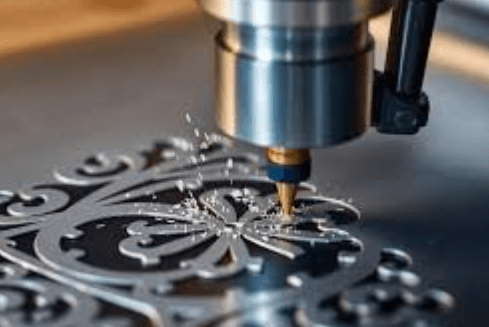
CNC stands for Computer Numerical Control. A desktop CNC machine is a motorized tool that follows digital instructions to cut, carve, or mill materials with high precision. Unlike manual cutting tools, a CNC router removes material in three dimensions using a spinning bit — making it ideal for detailed woodworking, sign making, furniture prototyping, and custom parts manufacturing.
CNC machines excel with rigid materials such as wood, MDF, acrylic, soft metals, and foam. They are well-suited for projects that require structural depth and 3D relief carving — something flat laser tools simply cannot replicate.
What Is a Laser Engraver?
A laser engraver uses a focused beam of light to burn, etch, or cut materials. It works by directing a high-powered laser across the surface of a material, vaporizing it to create designs, patterns, or cuts. Laser engravers are particularly popular for personalization projects — think custom gifts, branded merchandise, leather goods, and detailed artwork on wood or acrylic.
Laser machines work well on thin materials and are generally faster than CNC routers for flat engraving tasks. They require less physical setup, and modern diode laser engravers are compact enough to fit on a standard desk.
Desktop CNC vs Laser Engraver: Key Differences
Understanding the core differences helps beginners choose the right tool. If you want a detailed comparison specifically for beginners, the guide on desktop CNC vs laser engraver from Two Trees 3D is an excellent starting point.
Here is a quick breakdown:
- Cutting Depth: CNC machines carve deep into materials in 3D; laser engravers work primarily on the surface.
- Material Compatibility: CNC handles harder materials like thick wood and soft metals; lasers excel on thin materials like leather, paper, and thin plywood.
- Speed: Laser engravers are generally faster for surface engraving; CNC takes longer but produces structural results.
- Noise and Dust: CNC machines produce significant dust and noise; laser engravers are quieter but produce fumes that need ventilation.
- Learning Curve: Both require learning design software, but laser engravers tend to be slightly easier to set up initially.
- Cost: Entry-level laser engravers can be cheaper, but CNC bundles often provide better long-term versatility.
Who Should Choose a Desktop CNC Router?
A desktop CNC machine is the right choice if you plan to work with thicker materials, create structural pieces, or want to produce 3D relief carvings. It is ideal for:
- Woodworkers and furniture makers who need precision cutting
- Sign makers creating raised or engraved text and logos
- Small business owners making custom wooden products
- Hobbyists interested in prototyping or making functional parts
- DIY enthusiasts working with MDF, plywood, or soft aluminum
Who Should Choose a Laser Engraver?
Laser engravers are the better fit if you focus on personalization, surface decoration, and fast turnaround on flat projects. Consider a laser engraver if you:
- Make custom gifts, awards, or branded items
- Work with leather, fabric, or thin wood sheets
- Run an Etsy shop or small merchandise business
- Want to engrave photos or artwork with fine detail
- Need a machine with a smaller footprint and faster setup
Can You Use Both?
Absolutely. Many makers eventually own both a CNC router and a laser engraver because they complement each other. A CNC machine can cut and shape a wooden piece, while a laser engraver adds fine surface details, branding, or artwork. Together, they cover the full spectrum of desktop fabrication.
If budget is a concern, start with the tool that best matches your primary use case. You can always add the second machine as your business or hobby grows.
Getting Started with Desktop CNC: What to Look For
When shopping for your first CNC router, pay attention to the following factors:
- Work Area Size: Larger work areas let you handle bigger projects. Common beginner sizes range from 3018mm to 6050mm.
- Spindle Power: A more powerful spindle handles harder materials. Look for at least 300W for wood and soft metals.
- Rigidity: Aluminum frames are more stable than plastic ones, reducing vibration and improving cut quality.
- Software Compatibility: Ensure the machine works with industry-standard software like Lightburn, Candle, or VCarve.
- Community and Support: A strong user community means easier troubleshooting and more tutorials.
Why CNC Router Bundles Are Great for Beginners
One of the best ways for beginners to start is by purchasing a complete bundle rather than buying individual components separately. CNC router bundles from Two Trees 3D, for example, include the machine, accessories, and everything needed to start your first project right out of the box — removing the guesswork from what to buy.
Bundles save money compared to buying each component separately. They are also curated to ensure compatibility — meaning the bits, clamps, and software included all work together seamlessly. For someone new to CNC, this can save hours of frustrating research and trial and error.
See also: The Evolution of Financial Technology Systems
Safety Tips for Beginners
Both CNC machines and laser engravers involve hazards that beginners must take seriously:
- Always wear safety glasses when operating a CNC router — debris and chips fly at high speed.
- Use proper ventilation when running a laser engraver — burning materials releases fumes that can be harmful.
- Never leave machines running unattended, especially during early test runs.
- Keep a fire extinguisher nearby, particularly when using a laser engraver.
- Secure your workpiece firmly before starting a CNC cut to prevent movement during operation.
Final Thoughts
Both desktop CNC machines and laser engravers are incredible tools that can unlock a new world of creativity and productivity. The best choice depends entirely on your goals, budget, and the materials you work with most. If you value depth and structural cutting, go with a CNC router. If you need speed, precision surface marking, and versatility with thin materials, a laser engraver is your friend.
Whichever path you choose, starting with quality hardware and a complete beginner-friendly package will make the learning curve far more manageable. Take your time, start with simple projects, and let your skills grow naturally. The world of desktop fabrication is waiting for you.
— End of Article (~1,050 words) —